MailerLite is a great platform to streamline your marketing efforts. I find this platform one of the best solutions for businesses, whether you’re looking for ways to capture new subscribers, gather feedback, or promote a course on your blog.
But what if I tell you there’s a way to further simplify your workflow process?
If you love using Breakdance forms on your WordPress site, then here’s the good news. You can automatically send forms straight to your MailerLite app without lifting a finger.

The integration process is very easy - it only takes a few minutes to set everything up.
Follow the steps in this guide to learn how to send user info to your MailerLite account every time someone submits a form.
Create a Form in Breakdance
On your WordPress dashboard, create a new page. Open and edit it on your Breakdance Builder.
Create a new section and add the ‘Form Builder’ element. Adjust the size, background color, and spacing to your liking.

Once you’re done, save your page. Come back to it later after setting up your MailerLite API.
Setup MailerLite Group and API
1) Create a Group on MailerLite
Let’s create a ‘group’ to store user info whenever they submit a form. By doing so, you can group subscribers who have shown interest in a specific topic or product.
Before we proceed, make sure you have registered an account in MailerLite.
On your dashboard, navigate to Subscribers > Group. Go ahead and click ‘Add new group.’

Enter a group name and click ‘Create.’
2) Generate Your MailerLite API Token
Next, we’ll need an API key to integrate MailerLite with Breakdance. Navigate to ‘Integrations.’ On the API field, click ‘Use.’

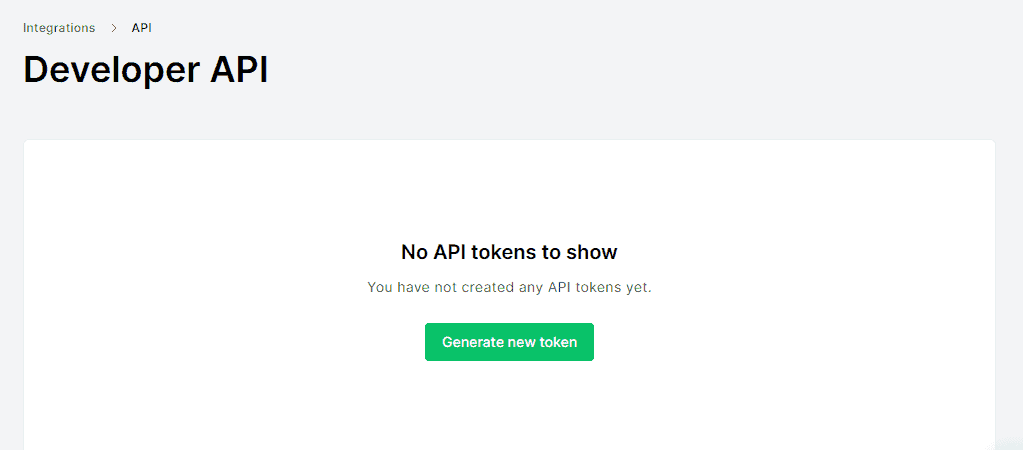
On the API tab, tap ‘Generate new token.’
Here, you will see a pop-up window. Enter a token name, click the ‘Terms of Use’ checkbox, then tap ‘Create token.’
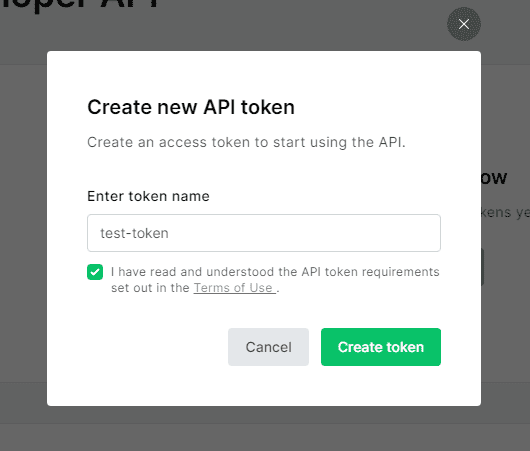
Important note: When generating an API token in MailerLite, you’ll only get to see it once. So, make sure to copy and save it in a secure place before closing.

Setup MailerLite WordPress Integration
1) Paste API Token on WordPress
Open your WordPress dashboard. On the left-hand side, click Breakdance > Settings > API Keys.
Then, paste your API token on the MailerLite API Key field, as shown.

Save the changes.
2) Add MailerLite on Form Actions
Back to your Breakdance editor, select the ‘Actions’ dropdown menu, and locate ‘‘Actions After Submission.’ You’ll see a list of apps that you can integrate with Breakdance. Go ahead and choose ‘MailerLite.’
Once you’ve done this, a ‘MailerLite’ option will emerge below the ‘Actions After Submission’ menu. Click its edit icon to set up the integration.

You should see a pop-up window like the one below. Choose a group and map your form fields correctly.

Make sure that you correctly map all the fields. Check that the fields are arranged in the same order.
Test Your Breakdance Form
1) Enter User Info on Breakdance Form
Open your live form page on the browser. Enter a name and email address. Then, click submit.

2) Verify Result in MailerLite
Once you see a success message, verify the result by opening your MailerLite dashboard.
On the left-hand side of the page, navigate to ‘Subscribers.’. At the bottom, you should see the list of users that submitted a form.

