So, you have a long list of e-commerce sites and you want to know which stores are hosted by Shopify.
But you don’t have hours to spend checking your list one by one. You need the results. And you want them fast.
Clay is a powerful tool that can help you enrich your prospects, whether you’re looking for their Shopify store info or just curious about other details.
So, let’s see how Clay works to make your research process simpler.
Why It's Useful to Know if An E-Commerce Uses Shopify
There could be many reasons why someone would be interested to know the Shopify store status of any website. Let me provide you a few examples:
- Affiliate marketing: Let’s say, you’re a blogger or an influencer. You might zero in on Shopify-based stores for collaborations or product reviews.
- Service pitching: If you’re selling a service tailored for Shopify-specific features, you might be looking for potential clients who are actively using this platform.:
- Market research: Knowing the Shopify store status of competitors might provide you insights about their product costs, strategies, and limitations.
- Integration possibilities: Some businesses might be looking for partnerships with e-commerce websites. Knowing whether a site is Shopify-hosted or not will help them assess the compatibility and feasibility of their offerings.
Where to Find a List of E-Commerce Websites
Certain sites can provide you with a comprehensive list of e-commerce websites. Here are the ones I recommend:
How to Know the Shopify Store Status of Prospect Websites Using Clay
1) Import Your Data
Let’s assume that you already have a list of e-commerce sites you’re interested in. The first thing that you need to do is upload your list on Clay.
On your dashboard, add a new table.
Click ‘Import Data’ at the bottom of the page. Then, choose the CSV file that contains your list of e-commerce websites.

Notice the default columns added to your table. We don’t really need this, so you can delete or hide them for now, as shown here.

2) Add Enrichment
The next step is to enrich our e-commerce list by adding information about their Shopify store status.
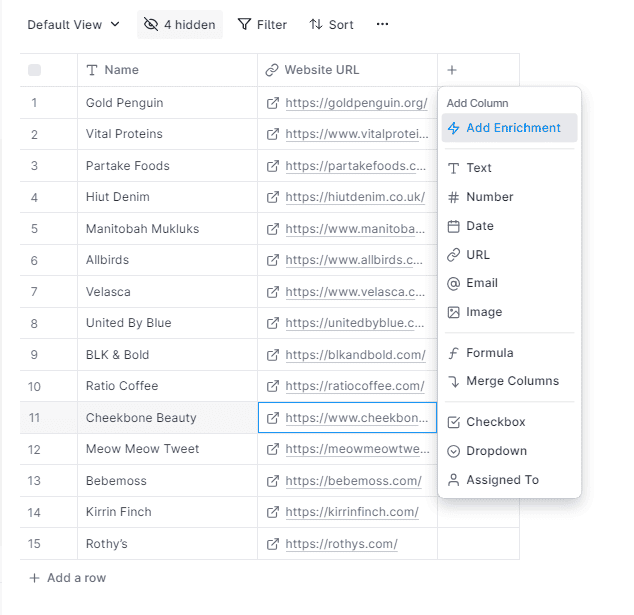
So go ahead and tap the ‘+’ sign button on the table. Then, choose ‘Add Enrichment’ as shown below.
3) Check the Website’s Shopify Status
In the pop-up window, we’ll need to select an action to determine if a website is hosted on Shopify.
Simply type the relevant keywords in the search field — it's quicker than searching through the list. For this tutorial, type "shopify" and select "Check Shopify Store Status" from the results, as shown.

4) Set the Website URL as Input
In the next window, we’ll need to select a column as input. Just tap the drop-down menu and choose the column that contains the e-commerce links. In this example, let’s choose ‘Website URL.’

Once you’re done, hit save and run.
5) Final Output
Wait for Clay to complete its run. Note that this might take a few seconds, depending on how long your list is.
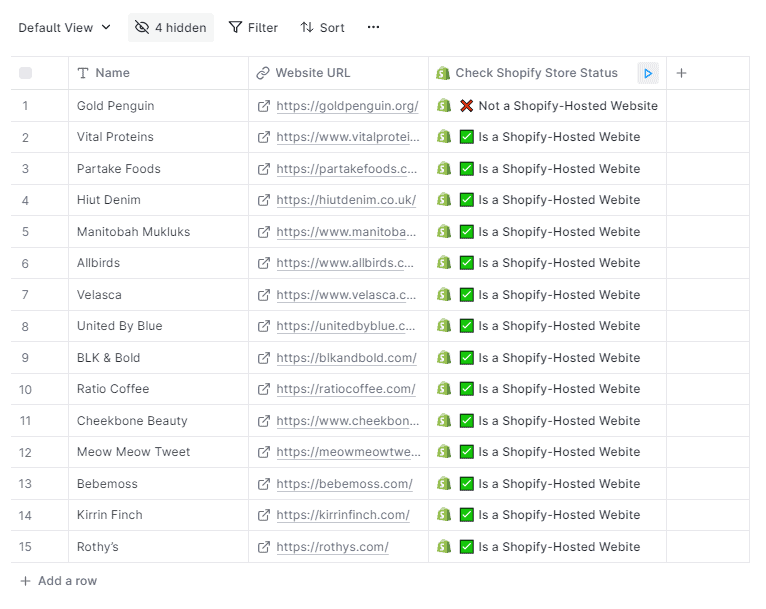
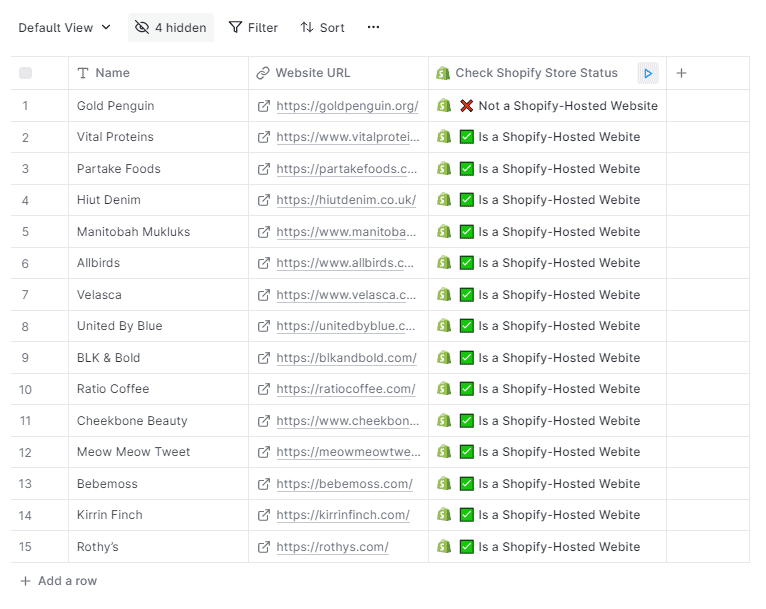
Once it’s finished, your table should now show either 'true' or 'false' to indicate if an e-commerce link is on Shopify, as shown here. Go ahead and use this data to move forward with your next goal.
What’s Next?
Clay offers a straightforward process to determine the Shopify store status of your prospect websites. Now that you know how it’s done, it’s time to level up your game.
Clay's capabilities extend beyond just identifying e-commerce platforms. It comes with other compelling features, too, such as retrieving emails of your prospects on LinkedIn. So make sure to explore these functionalities to fully maximize your outreach strategies!
Hopefully, you’ve found this guide helpful. If you have any questions, please drop them in the comments below.
